
Children are exposed to smartphones earlier than ever before. While these devices offer convenience, communication, and entertainment, many parents worry about the potential negative effects of excessive screen time, social media exposure, and online distractions. The goal of exploring smartphone alternatives for kids is to provide essential connectivity without the endless apps and feeds that make modern phones so absorbing. These alternatives allow children to stay reachable and safe while helping them develop healthy habits around technology use.
In 2026, families have access to a wide range of innovative devices designed for communication, safety, and minimal digital distraction. Below is a detailed guide to the top options, along with tips for setting boundaries, understanding developmental needs, and addressing common concerns.
Basic Phones With Calling and Texting Only
For early teens or preteens who need simple communication, basic phones are the most effective choice. These devices focus on essential functions such as calling and texting, with no access to social media or app stores.
1. Nokia 105 / 215 Series
These classic feature phones are reliable and durable, featuring long battery life, physical buttons, and easy-to-read screens. Their lack of internet access and app stores prevents digital distractions, making them ideal for younger children who need a phone mainly for communication and emergencies.
_(base).jpg)
2. Alcatel Go Flip Series
Flip phones remain a popular choice due to their compact design and familiar interface. Some models include basic features like a camera, music player, and FM radio, but they do not allow access to apps or social media platforms. Their small size and sturdy design make them convenient for children to carry independently.
3. Light Phone (Original)
The Light Phone offers a minimalist experience, focusing exclusively on calls and text messaging. Certain versions include simple scheduling features but avoid web browsing, apps, and social media, creating a distraction-free communication tool for older preteens or teens.
Why It Works
Basic phones ensure children can communicate in emergencies or coordinate with parents while avoiding addictive notifications or social media pressures. For many families, this represents a balanced step between strict digital restriction and unrestricted smartphone use.
Communication Smartwatches
Smartwatches designed for children offer a unique alternative, combining portability, GPS tracking, and communication features without exposing kids to the full internet. These devices are especially suitable for younger children who need to be reachable but do not require a smartphone’s full capabilities.
4. Xplora X5 Play
A popular choice for families, the Xplora X5 Play supports voice calling, step tracking, GPS location, and safe zones. Parents can manage contacts and control features through a companion app, ensuring children remain reachable without accessing the internet or social media.

5. Angel Watch Series R
This safety-focused smartwatch includes real-time GPS tracking, SOS calling, and geofencing. Voice chat is permitted, but there is no access to web browsing or social media apps. It is ideal for families prioritizing location monitoring and communication in a compact wearable form.
6. VTech Kidizoom Smartwatch
Designed for younger children, this device includes educational games, a camera, and creative activities without internet access. It encourages responsibility and independence while keeping children entertained in a safe digital environment.
Why It Works
Smartwatches are harder to misplace than phones and remain accessible on the wrist at all times. They provide essential communication and safety features while eliminating the risks associated with full smartphone access, such as social media addiction and app overload.
Tablet With Supervised Access
For home-based connectivity and learning, tablets offer controlled internet access with robust parental oversight. Shared tablets can support homework, video calls, and educational apps without giving children full smartphone privileges.
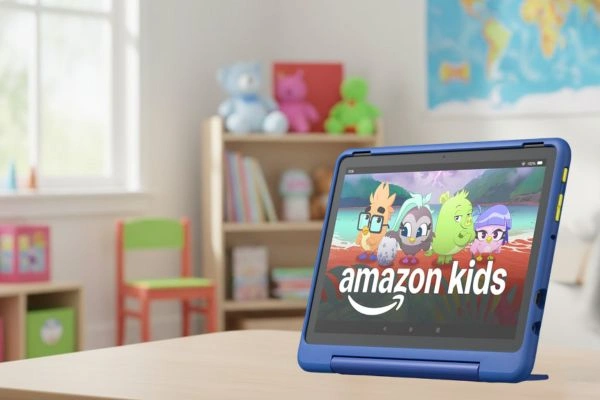
7. Amazon Fire Kids Edition Tablet
This tablet comes with advanced parental controls, allowing parents to set age-appropriate profiles, filter content, and limit screen time. It also includes a durable, kid-proof case that can withstand daily use, making it a safe and practical option for children of various ages.
8. Lenovo Tab M8 With Kids Mode
This budget-friendly tablet features a dedicated kids mode, giving parents control over app downloads, content access, and usage time. Educational apps and creative games are prioritized, helping children stay focused while exploring digital resources.
Why It Works
Shared tablets allow children to access educational materials, video calls, and homework tools without the distractions of a smartphone. Using family Wi-Fi and shared accounts ensures parental visibility and promotes responsible device use while keeping technology in communal spaces rather than private ones.
Email and Messaging Devices
Some devices focus exclusively on communication without internet or app access. These are particularly valuable for children who need to stay in touch without exposure to social media or other digital distractions.
9. Relay Kids Communicator
A push-to-talk device that connects to parent phones and other Relay devices. It features GPS tracking but does not allow web browsing or app downloads, making it ideal for safety and communication without excess screen time.

10. Gabb Watch / Gabb Phone Z2
The Gabb ecosystem focuses on safe, restricted communication. Children can call or message only parent-approved contacts. There is no access to social media, YouTube, or app stores, making the experience safe and focused.
Why It Works
Messaging devices keep children reachable and provide peace of mind for parents while avoiding the risks associated with full smartphones. Limited communication and GPS functionality ensure safety and convenience without distractions.
Comparing Alternatives
| Device Type | Key Features | Best For |
|---|---|---|
| Basic Phone | Calls, texts only | Early teens needing essential communication |
| Kids Smartwatch | GPS, approved contacts | Younger children gaining independence |
| Tablet With Parental Controls | Supervised internet access | Homework, learning, and shared media |
| Messaging Device | Limited messaging, no browser | Safety when children are away from home |
How to Set Tech Boundaries That Work
Choosing the right device is only one part of the solution. Establishing clear boundaries helps children develop healthy tech habits that can last into adolescence and beyond.
Make a Plan Together
Children are more likely to follow rules when they understand the reasoning behind them. Families should create a tech plan outlining when screens are allowed, which features are appropriate, and daily limits for device use.
Designate Phone-Free Times
Setting phone-free zones, such as during meals, family activities, and bedtime, encourages focus, fosters real-world interaction, and improves sleep habits.
Use Built-In Parental Controls
Even basic devices often include parental oversight features. Many phones, watches, and messaging devices connect to companion apps that allow parents to approve contacts, track usage, and set time limits.
Talk About Online Safety
Open conversations about safe device use, privacy, and online etiquette build awareness and confidence. Children should understand why some apps or websites are off-limits and how to respond to online threats.
Encourage Other Activities
Balancing screen alternatives with hobbies like sports, art, music, and reading fosters creativity, independence, and social skills. Encouraging children to pursue real-world activities helps them see technology as a tool, not a constant source of entertainment.
Addressing Common Concerns
All Their Friends Have Smartphones
Peer pressure is real, but delaying smartphone ownership can be framed positively. Families often find that when multiple households adopt similar alternatives, children feel less pressure to keep up with peers.
They Need It for Safety
Basic phones, smartwatches, and messaging devices provide essential safety features such as GPS tracking and emergency calling. Children remain reachable while avoiding the distractions of unrestricted internet access.
Won’t They Feel Left Out?
Some children may feel excluded when peers share photos or updates online. Parents can address this by setting social media age limits and guiding children on how to engage safely when they are ready. Controlled exposure promotes digital literacy while protecting mental health.
The Role of Educators and Communities
Schools and community organizations increasingly provide guidance on age-appropriate technology use. Programs that focus on digital well-being help families make informed decisions about screen time and device ownership. Parent networks often establish technology pacts, agreeing that children can use school devices or shared tablets while delaying personal smartphones until maturity or readiness. These agreements reduce peer pressure and create consistent rules across households.
Extra Tips for Families
- Rotate Devices: Alternating between tablets, watches, and messaging devices reduces overreliance on a single device.
- Set Achievable Goals: Reward adherence to tech plans with extra offline activities or privileges.
- Monitor, Don’t Micromanage: Encourage independence while maintaining oversight of usage.
- Teach Digital Skills Gradually: Introduce coding, online safety, and responsible device use on supervised devices before transitioning to full smartphones.
- Adapt Over Time: Gradually increase freedoms and responsibilities as children mature and demonstrate digital responsibility.
Helping Kids Thrive With Smartphone Alternatives
Smartphone alternatives give families the ability to balance connectivity, safety, and focus. Options ranging from basic phones and messaging devices to supervised tablets and smartwatches allow parents to select tools that fit their child’s age, development, and lifestyle. There is no single “right” age for a child to receive a full smartphone. The most important factors are thoughtful device selection, clear boundaries, and guidance in developing positive digital habits.
By using age-appropriate alternatives, children learn to manage technology responsibly, focus on real-world experiences, and interact safely with the digital world. These devices act as a bridge to full digital independence, making technology a tool rather than a constant companion. Families that implement these alternatives thoughtfully provide children with a safer, more focused, and healthier start in navigating the digital era, fostering skills and habits that will benefit them throughout their lives.