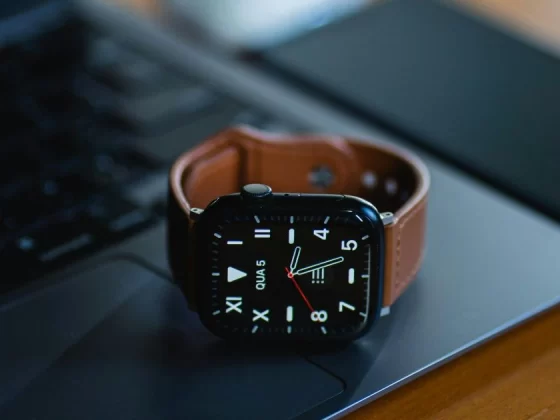
From tracking workouts to acting as a walkie-talkie, there is very little a modern Apple Watch cannot do. One of its most useful and underrated features is sleep tracking. What began as a basic overnight log has grown into a detailed health tool that measures sleep stages, heart rate, breathing patterns, blood oxygen levels, and even signs linked to sleep apnea.
For anyone searching for a reliable sleep tracker, the Apple Watch now ranks among the strongest options available. Even users who did not buy one with sleep tracking in mind can head to bed knowing they are wearing a device capable of delivering meaningful sleep insights. Overnight data collected by the watch helps explain post-workout recovery, long-term sleep habits, and overall wellness. In some cases, it can even highlight early warning signs of sleep-related breathing issues.
This guide explains how Apple Watch sleep tracking works, why accuracy matters, and which settings should be enabled to get the most reliable results. It also compares the Apple Watch to dedicated sleep trackers and answers common questions for users looking to improve both their data and their rest.
Why Sleep Tracking On Apple Watch Matters
Sleep is one of the most important pillars of health, yet it is often the most overlooked. Poor sleep can affect mood, focus, recovery, and long-term heart health. The Apple Watch uses a mix of motion sensors, heart rate data, blood oxygen readings, and temperature trends to build a clear picture of nightly rest.
Unlike basic sleep apps that guess bedtime based on phone usage, the Apple Watch records real physiological data while worn. This makes its reports far more useful for people who want to understand not just how long they sleep, but how well they sleep.
For active users, sleep data also connects directly to recovery. A lower resting heart rate overnight, stable breathing patterns, and consistent sleep stages often point to good recovery from training. On the other hand, disrupted sleep or elevated heart rate can signal stress, illness, or overtraining.
How Apple Watch Sleep Tracking Works
Apple Watch sleep tracking relies on several key sensors working together:
- Accelerometers detect movement to estimate when sleep begins and ends
- Heart rate sensors track resting heart rate and variability
- Blood oxygen sensors monitor oxygen saturation during sleep
- Temperature sensors measure wrist temperature trends over time
These signals help the watch estimate sleep stages such as light sleep, deep sleep, and REM sleep. The data is stored in the Apple Health app, where trends can be reviewed over days, weeks, and months.
Sleep tracking runs automatically when Sleep Focus is enabled, and the watch is worn overnight. No manual start button is required once the system is set up correctly.
How Apple Watch Compares To Dedicated Sleep Trackers
Dedicated sleep trackers such as Oura, Garmin sleep bands, and under-mattress sensors are built specifically for overnight use. They often offer longer battery life and lighter designs that some users find more comfortable for sleep.
The Apple Watch, however, stands out for its balance of features. It combines sleep tracking with daytime fitness, communication tools, and health monitoring in one device. While battery life is shorter than some sleep-only trackers, the depth of data and integration with other health metrics give the Apple Watch a strong edge.
Apple Watch Vs Oura Ring
The Oura Ring is small, lightweight, and built entirely around sleep and recovery. It excels in comfort and battery life. The Apple Watch provides more detailed heart rate graphs, broader health features, and real-time alerts. Users who want a single device for both day and night often prefer the Apple Watch.
Apple Watch Vs Garmin Sleep Tracking
Garmin watches offer excellent battery life and strong sleep metrics, especially for athletes. Apple Watch sleep tracking is easier to understand, more visual, and tightly integrated with the Health app. For users focused on overall wellness rather than endurance training alone, Apple Watch data is often easier to act on.
Essential Settings For Accurate Apple Watch Sleep Tracking
Getting accurate sleep data depends heavily on the correct setup. The following settings should be reviewed and enabled to ensure reliable results.
1. Turn On Sleep Tracking
The first step is confirming that Apple Watch is set as the primary sleep tracker. This ensures that overnight data comes from the watch rather than estimates based on phone usage.
To enable sleep tracking:
- Open the Watch app on the paired iPhone
- Go to My Watch
- Tap Sleep
- Turn on Track Sleep With Apple Watch
Once enabled, the watch automatically records sleep when worn during Sleep Focus. Data is saved in the Apple Health app for review.
Without this setting turned on, the Health app may only estimate sleep based on phone activity, which is far less accurate.
2. Make Sure The Fit Is Correct
Fit plays a major role in sleep tracking accuracy. A watch that is too loose may lose contact with the skin, while one that is too tight can be uncomfortable and disrupt sleep.
A good guideline is a secure but comfortable fit that allows slight movement without gaps. Many users follow a two-finger rule, meaning two fingers can slide between the wrist and strap without resistance. This keeps sensors in contact without cutting off circulation.
Switching to a softer band at night can also help. Silicone or fabric straps tend to be more comfortable for sleeping than metal or rigid bands.
3. Enable Wrist Detection
Wrist Detection allows the Apple Watch to know when it is being worn. This feature is essential for background heart rate tracking, which plays a key role in sleep stage detection.
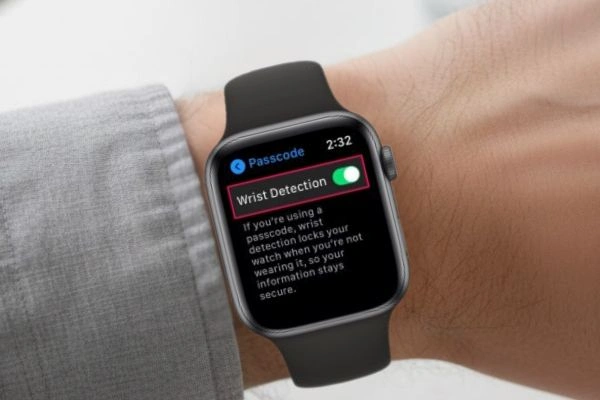
To enable Wrist Detection:
- Open the Watch app
- Go to Passcode
- Turn on Wrist Detection
If this setting is off, the watch may skip background heart rate readings overnight. Without these readings, sleep stage data becomes far less accurate.
4. Turn On Blood Oxygen And Sleep Apnea Features
Blood oxygen levels naturally fluctuate during sleep, but frequent or severe drops can indicate breathing issues. Apple Watch models that support blood oxygen tracking can monitor these changes overnight.
To enable blood oxygen tracking:
- Open the Watch app
- Go to Blood Oxygen
- Turn on Blood Oxygen Measurements
- Allow background measurements during Sleep Focus
Newer Apple Watch models also include an FDA-cleared sleep apnea notification feature. After wearing the watch for a minimum number of nights, the system analyzes breathing disturbances and alerts the user if patterns suggest possible sleep apnea. Any such alert should be followed up with a healthcare professional for proper diagnosis.
5. Turn On Charging Reminders
Battery life remains one of the biggest challenges for overnight tracking. Apple Watch typically needs to be charged daily, and sleep tracking requires enough battery to last through the night.
Apple recommends at least 30 percent battery before bedtime. Charging reminders help ensure the watch is ready.
To enable charging reminders:
- Open the Watch app
- Go to Sleep
- Turn on Charging Reminders
With this setting active, the watch sends a reminder to charge before bedtime and notifies the user when charging is complete.
6. Understand Wrist Temperature Tracking
Apple Watch models with temperature sensors track wrist temperature automatically during Sleep Focus. While this feature requires no manual setup, understanding the data can be helpful.
Body temperature naturally drops at night to support sleep. Changes in baseline temperature over time can reflect stress, illness, or changes in sleep habits. Reviewing this data regularly offers insight into long-term wellness trends.
Temperature data can be found in the Health app under Body Measurements and Wrist Temperature.
Use Sleep Focus Consistently
Sleep Focus is not just about tracking. It also helps protect sleep quality by limiting notifications, dimming the display, and reinforcing consistent sleep and wake times. Setting a regular Sleep Focus schedule trains the body to expect rest at the same time each night. Consistency improves both sleep quality and the accuracy of sleep data collected by the watch.
Common Sleep Tracking Mistakes To Avoid
Even with the right settings enabled, certain habits can reduce accuracy.
- Wearing the watch loosely at night
- Forgetting to enable Sleep Focus
- Allowing battery levels to drop too low
- Using rigid or uncomfortable bands that disrupt sleep
Addressing these issues often leads to more consistent and meaningful sleep reports.
Frequently Asked Questions
Is Apple Watch A Reliable Sleep Tracker?
Yes. Apple Watch ranks among the most reliable consumer sleep trackers available. Its accuracy improves when all recommended settings are enabled, and the watch fits properly.
Does Apple Watch Track Naps?
Apple Watch primarily focuses on overnight sleep during Sleep Focus. Short naps may not always be recorded unless they are long and occur during a rest period.
Can Apple Watch Detect Sleep Apnea?
Certain models include a sleep apnea notification feature that looks for breathing disturbances. This is not a medical diagnosis, but it can prompt further evaluation by a doctor.
Does Sleep Tracking Drain Battery Faster?
Sleep tracking uses sensors overnight, but battery drain is moderate. Charging before bed usually provides enough power for a full night of tracking.
What Is The Best Band For Sleeping With Apple Watch?
Soft silicone or fabric bands are generally the most comfortable for sleep. Metal and stiff bands can cause discomfort and reduce sensor contact.
Making The Most Of Apple Watch Sleep Tracking
Apple Watch sleep tracking has grown into a powerful health tool. When set up correctly, it delivers meaningful insights into sleep quality, recovery, and overall wellness. By enabling the right settings, ensuring a proper fit, and maintaining consistent routines, users can unlock the full value of overnight data.
As sleep technology continues to evolve, the Apple Watch remains one of the most accessible and capable options for tracking rest without adding another device to the nightstand. For anyone looking to understand sleep habits better and improve nightly recovery, it stands as a reliable companion both day and night.